
Since its launch in 2008, Mendeley has evolved from a simple citation tool into an essential ecosystem for researchers across disciplines. The platform addresses fundamental pain points in academic workflows: the chaos of scattered PDF files, the tedium of manual citation formatting, and the isolation that often characterizes scholarly work. By integrating seamlessly with word processors and offering robust collaboration features, Mendeley has redefined what it means to conduct research in the 21st century, making academic work more efficient, organized, and collaborative than ever before.
What is Mendeley?
Mendeley is a reference management software and academic social network designed to help researchers organize, share, and discover academic literature. Here’s what it offers:
Core Functions:
- Reference Management: Store, organize, and cite research papers and documents
- PDF Management: Import and annotate PDFs with highlighting and note-taking features
- Citation Generation: Automatically format citations and bibliographies in various academic styles (APA, MLA, Chicago, etc.)
- Word Processor Integration: Works with Microsoft Word and other writing software for seamless citation insertion
Social Features:
- Academic Networking: Connect with other researchers in your field
- Research Discovery: Find new papers based on your interests and reading history
- Collaboration: Share research collections and collaborate on projects with colleagues
- Research Analytics: Track citation metrics and see trending papers in your field
Key Features of Mendeley
Reference Management
Mendeley’s core strength lies in its comprehensive reference management capabilities. Users can automatically import bibliographic information from PDFs, web pages, and online databases. The platform supports thousands of citation styles, from APA and MLA to specialized journal formats, ensuring accurate formatting for any publication requirement. The automatic metadata extraction saves researchers countless hours of manual data entry.
PDF Organization and Annotation
The platform serves as a centralized repository for research documents, allowing users to upload, organize, and tag PDFs efficiently. Built-in annotation tools enable highlighting, note-taking, and commenting directly within documents. These annotations sync across all devices, making it easy to review notes whether working from a desktop, tablet, or smartphone.
Cross-Platform Synchronization
Mendeley operates seamlessly across multiple platforms and devices. The desktop application, web interface, and mobile apps maintain perfect synchronization, ensuring research libraries remain accessible regardless of location or device. This cloud-based approach eliminates the frustration of lost files or outdated versions.
Citation Integration
Word processor plugins for Microsoft Word, LibreOffice, and other writing applications allow researchers to insert citations and generate bibliographies instantly. The “Cite as you Write” feature updates references automatically, maintaining consistency throughout document revisions and eliminating formatting errors.
Collaborative Research Tools
Group creation and sharing features facilitate team-based research projects. Multiple users can contribute to shared libraries, annotate documents collaboratively, and maintain version control. Private and public group options provide flexibility for different collaboration needs, from small research teams to large academic communities.
Academic Social Networking
Mendeley functions as a professional network where researchers can follow peers, discover new publications, and track research trends. The platform recommends papers based on reading history and research interests, helping users stay current with developments in their fields.
Research Analytics and Insights
Advanced analytics provide valuable insights into research impact and trends. Users can track citation metrics, monitor paper popularity, and identify emerging research areas. These features help researchers gauge the influence of their work and spot new opportunities for collaboration.
Database Integration
Direct integration with major academic databases and search engines streamlines the research discovery process. Users can search and import references from PubMed, Google Scholar, IEEE Xplore, and hundreds of other databases without leaving the Mendeley interface.
Backup and Security
Automatic backup ensures research collections remain safe and accessible. Mendeley maintains multiple copies of user data across secure servers, protecting against data loss from hardware failures or accidental deletions. Privacy controls allow users to manage the visibility of their research profiles and libraries.
How to Use Mendeley
Getting Started
Account Creation
Visit Mendeley.com and create a free account using your email address or institutional credentials. Students and faculty can often sign up using their university email for additional features and storage space.
Installation
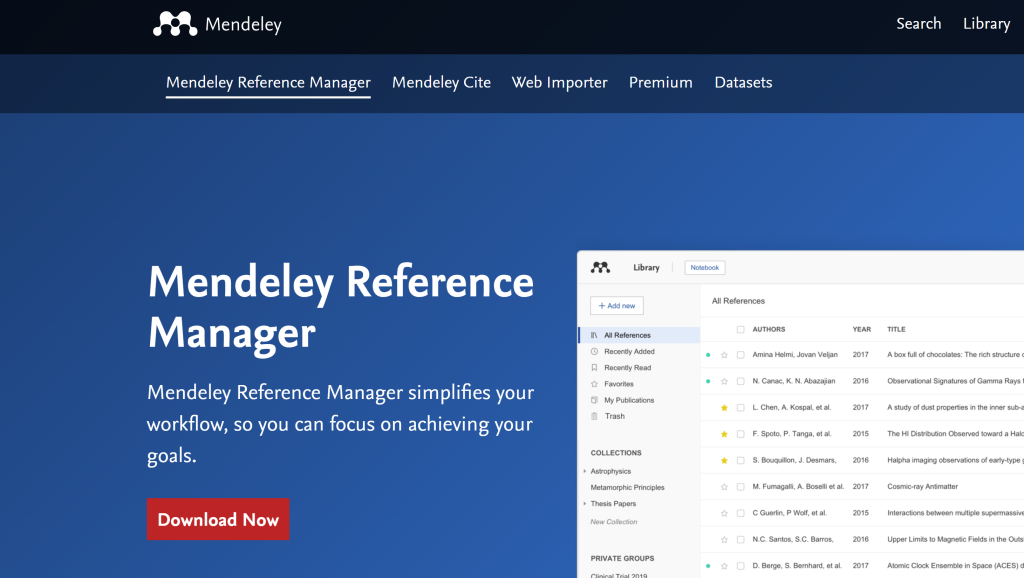
Download and install the Mendeley Reference Manager desktop application from the official website. The software is available for Windows, Mac, and Linux systems. Also install the web browser extension (Web Importer) for Chrome, Firefox, or Safari to easily capture references while browsing online.
Building Your Library
Adding References
Manual Entry: Click “Add new” and select “Add entry manually” to input reference details for books, journal articles, conference papers, or other sources.
PDF Import: Drag and drop PDF files directly into Mendeley. The software automatically extracts metadata including title, authors, journal, and publication year.
Web Importer: Use the browser extension to capture references directly from academic databases, publisher websites, or Google Scholar. Simply click the Mendeley icon in your browser toolbar when viewing a paper online.
Database Search: Search directly within Mendeley using the built-in catalog of millions of research papers. Click “Search” in the toolbar and enter keywords, authors, or titles.
Organizing Your Collection
Create folders to categorize references by project, topic, or research area. Use tags to add keywords for easier searching. The “Recently Added” and “Recently Read” smart folders help track your latest additions and reading progress.
Working with PDFs
Annotation Tools
Open any PDF in your library to access annotation features:
- Highlighting: Select text and choose highlight colors
- Sticky Notes: Add comments and thoughts at specific locations
- Text Notes: Create detailed notes that sync across all devices
Full-Text Search
Use the search bar to find specific terms within your entire PDF collection. Mendeley searches through document content, titles, authors, and your personal notes.
Citing and Bibliography Generation
Installing Word Plugin
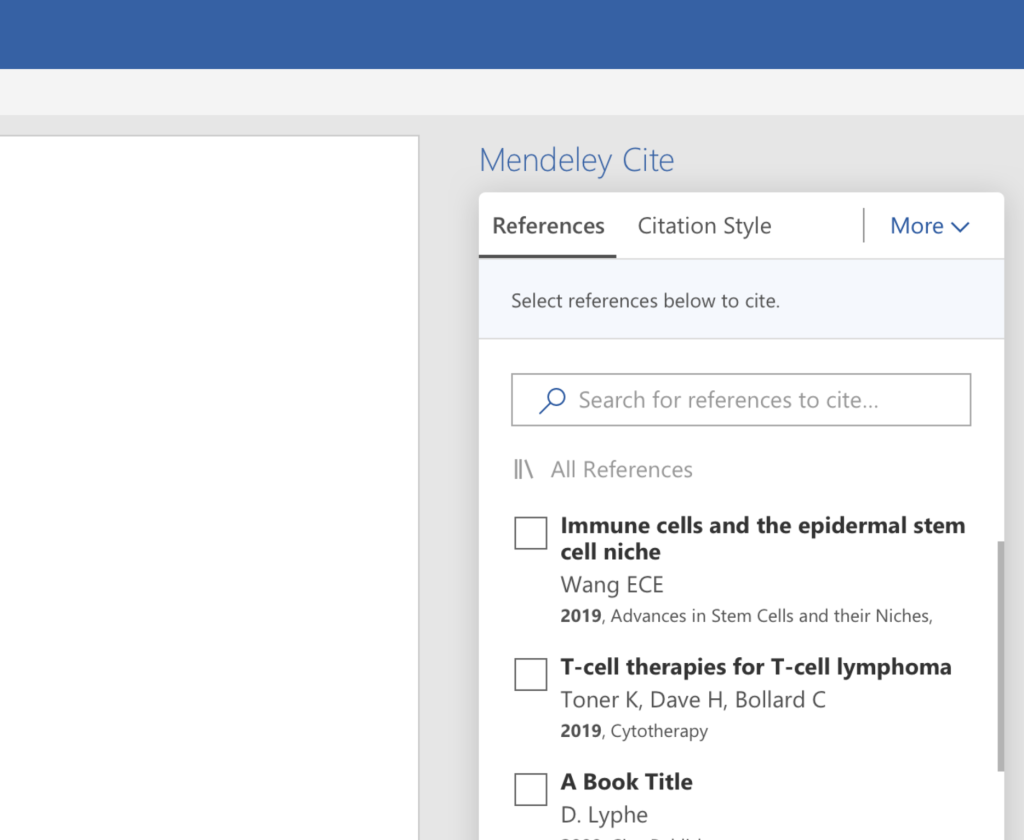
Download and install the Mendeley Cite plugin for Microsoft Word or LibreOffice from the Mendeley website. The plugin appears as a new toolbar in your word processor.
Inserting Citations
- Place your cursor where you want to insert a citation
- Click “Insert Citation” in the Mendeley toolbar
- Search for the reference in the popup window
- Select the correct paper and click “OK”
Creating Bibliographies
Click “Insert Bibliography” to automatically generate a reference list based on all citations in your document. Choose from over 9,000 citation styles including APA, MLA, Chicago, and journal-specific formats.
Changing Citation Styles
Select a different citation style from the dropdown menu in the Mendeley toolbar. All citations and the bibliography update automatically to match the new format.
Collaboration Features
Creating Groups
Click “Create Group” to start a collaborative research project. Choose between:
- Private Groups: Invite specific collaborators
- Public Groups: Open to anyone interested in your research topic
Sharing References
Add references to group libraries by dragging them from your personal collection. All group members can access, annotate, and discuss shared papers.
Group Discussions
Use the discussion feature to communicate with group members about specific papers or research questions without leaving the platform.
Advanced Features
Mendeley Web
Access your library through any web browser at mendeley.com. The web version provides full functionality for reading, annotating, and organizing references when away from your primary computer.
Mobile Apps
Download the Mendeley mobile app for iOS or Android to read papers, take notes, and access your library on tablets and smartphones. All annotations sync automatically across devices.
Profile Management
Create a professional research profile showcasing your publications, research interests, and academic affiliations. Connect with other researchers and discover new collaboration opportunities.
Export Options
Export your references in various formats (BibTeX, RIS, EndNote XML) for use with other reference management tools or direct import into journal submission systems.
Tips for Effective Use
Regular Maintenance
- Review and correct automatically imported metadata for accuracy
- Use consistent tagging and folder organization from the beginning
- Regularly backup your library using the export function
Search Optimization
- Use Boolean operators (AND, OR, NOT) for complex searches
- Search within specific fields like author or title for precise results
- Utilize saved searches for frequently accessed topics
Collaboration Best Practices
- Establish group naming conventions and organization standards
- Use group announcements to communicate important updates
- Regularly clean up shared folders to maintain organization
Integration Workflow
- Set up automatic PDF organization by connecting cloud storage services
- Use the “Watch Folder” feature to automatically import new PDFs
- Configure notification settings to stay updated on group activity and new recommendations
Benefits of Using Mendeley
1. Saves Time in Managing References
One of the biggest challenges in research is keeping track of multiple sources and citing them correctly. Mendeley allows users to import references directly from databases, journals, or PDFs, which reduces the manual effort of typing out bibliographic details. Its automatic citation generator supports thousands of citation styles, ensuring that your references and bibliography are always formatted correctly with minimal effort.
2. Increases Productivity in Research Writing
With Mendeley, users can manage all their references in one organized library. This eliminates the frustration of searching through scattered notes or files. The built-in search and tagging system helps researchers quickly locate relevant articles, saving time and increasing efficiency during the writing process.
3. PDF Management and Annotation
Mendeley is not just a reference manager—it also functions as a PDF reader. Users can highlight important sections, add notes, and annotate directly within the software. These annotations are automatically saved and can be accessed later, making it easier to recall key insights from articles without rereading entire documents.
4. Cloud Storage and Device Synchronization
Another major benefit of Mendeley is its cloud-based storage. This feature allows users to access their references, PDFs, and notes from multiple devices, whether on a computer, tablet, or smartphone. The synchronization ensures that changes made on one device are reflected across all others, which is especially useful for researchers who work across different platforms.
5. Collaboration and Networking Opportunities
Mendeley includes social and collaborative features that allow users to share references, create groups, and work together on projects. Research teams can build shared libraries, making it easier to coordinate work and keep everyone on the same page. Additionally, Mendeley’s online community provides opportunities to connect with other researchers, discover trending papers, and follow areas of interest.
6. Supports Academic Growth
By keeping research organized and accessible, Mendeley encourages good academic practices. Students learn how to manage references properly, avoid plagiarism, and improve the overall quality of their writing. For professional researchers, it streamlines workflows, helping them focus more on analysis and innovation rather than formatting citations.
Limitations of Mendeley
1. Limited Free Storage
Mendeley offers only 2 GB of free cloud storage, which may not be sufficient for researchers working with large numbers of PDFs or extensive libraries. Users who require more storage space must purchase a premium plan, which may not be affordable for students or early-career researchers.
2. Occasional Syncing Issues
Although Mendeley provides synchronization across devices, users sometimes experience syncing errors or delays. This can cause missing references or outdated libraries, especially when working offline or switching between multiple devices frequently.
3. Dependency on Internet Access
Many of Mendeley’s features, such as cloud syncing and collaboration, require internet connectivity. While offline use is possible, it limits access to the most valuable features, which can be inconvenient for users in areas with unstable internet connections.
4. Learning Curve for New Users
For beginners, Mendeley can feel overwhelming at first. Setting up the library, learning how to import references correctly, and mastering the citation plugin in Word or LibreOffice may take time. Users who are not comfortable with digital tools might struggle to take full advantage of its features.
5. Compatibility Issues
Some users encounter compatibility challenges with certain citation styles, word processors, or operating systems. For example, Mendeley’s citation plugin may not always work smoothly with the latest versions of Microsoft Word, requiring updates or troubleshooting.
6. Reduced Functionality After Elsevier Acquisition
Since Elsevier acquired Mendeley, some features—such as the Mendeley Funding tool and certain collaboration options—have been removed or altered. This has caused frustration among long-time users who relied on these functions.
7. Competition from Other Free Tools
While Mendeley is feature-rich, alternatives like Zotero offer more storage and open-source flexibility without subscription fees. For users who prioritize cost-free, unlimited use, Mendeley’s restrictions can be a disadvantage.
Mendeley vs. Other Reference Managers
Mendeley vs. Zotero
Overview
Zotero is an open-source reference management tool developed by the Roy Rosenzweig Center for History and New Media. Unlike Mendeley’s commercial model, Zotero operates as a nonprofit project with strong community support.
Key Differences
Ownership and Philosophy
- Zotero: Open-source, nonprofit, community-driven development
- Mendeley: Commercial platform owned by Elsevier since 2013
Cost Structure
- Zotero: Free with optional paid storage plans starting at $20/year for 2GB
- Mendeley: Free tier with 2GB storage, premium plans required for advanced features
Browser Integration
- Zotero: Superior web capture with robust support for complex websites, news articles, and legal documents
- Mendeley: Good web importer but more focused on academic databases
PDF Handling
- Zotero: Built-in PDF reader with annotation tools (added in recent versions)
- Mendeley: More mature PDF annotation features with better mobile sync
Social Features
- Zotero: Limited social networking capabilities, focuses on research tools
- Mendeley: Extensive academic social network with researcher profiles and discovery features
Best For: Zotero suits researchers prioritizing open-source tools, privacy, and extensive web capture capabilities. Mendeley appeals to users wanting social networking features and integrated academic discovery.
Mendeley vs. EndNote
Overview
EndNote is a well-established reference management system developed by Clarivate Analytics, widely used in academic institutions and known for its comprehensive citation management capabilities.
Key Differences
Pricing Model
- EndNote: Expensive desktop software ($249.95 one-time purchase or subscription plans)
- Mendeley: Free tier available with affordable premium upgrades
Installation and Access
- EndNote: Primarily desktop-based with web companion (EndNote online)
- Mendeley: Cloud-first approach with desktop, web, and mobile apps
Citation Style Support
- EndNote: Over 7,000 styles with robust custom style editor
- Mendeley: 9,000+ styles but limited customization options for free users
PDF Management
- EndNote: Basic PDF handling and annotation features
- Mendeley: Superior PDF annotation and full-text search capabilities
Collaboration Features
- EndNote: Limited sharing capabilities, mainly through EndNote online
- Mendeley: Comprehensive group collaboration with social networking elements
Institution Support
- EndNote: Strong institutional licensing and support programs
- Mendeley: Growing institutional presence but less established in traditional academic settings
Best For: EndNote works well for researchers in well-funded institutions requiring robust citation management and custom styles. Mendeley suits individual researchers and teams needing modern collaboration tools.
Mendeley vs. RefWorks
Overview
RefWorks is a web-based reference management platform owned by Ex Libris (part of Clarivate), designed primarily for academic institutions and libraries.
Key Differences
Access Model
- RefWorks: Primarily institutional licensing, limited individual subscriptions
- Mendeley: Individual accounts with institutional options available
Interface Design
- RefWorks: Traditional, library-focused interface
- Mendeley: Modern, researcher-friendly design with social elements
PDF Features
- RefWorks: Basic PDF storage without advanced annotation tools
- Mendeley: Comprehensive PDF management with highlighting and note-taking
Mobile Experience
- RefWorks: Limited mobile functionality
- Mendeley: Full-featured mobile apps for iOS and Android
Database Integration
- RefWorks: Excellent integration with library databases and catalogs
- Mendeley: Strong integration with major academic databases and search engines
Collaboration Tools
- RefWorks: Basic folder sharing within institutions
- Mendeley: Advanced group features with discussion tools and social networking
Best For: RefWorks suits institutions with strong library systems requiring database integration. Mendeley appeals to researchers wanting modern features and cross-platform functionality.
Mendeley vs. Papers
Overview
Papers (now part of ReadCube) focuses on PDF management and reading experience, targeting researchers who prioritize document organization and discovery.
Key Differences
Primary Focus
- Papers: PDF reading and management with discovery features
- Mendeley: Comprehensive reference management with social networking
Reading Experience
- Papers: Premium PDF reading interface with advanced navigation
- Mendeley: Standard PDF viewer with annotation capabilities
Citation Management
- Papers: Basic citation tools with limited style support
- Mendeley: Comprehensive citation management with extensive style library
Platform Availability
- Papers: Mac and iOS focused (Windows support limited)
- Mendeley: Full cross-platform support including Linux
Pricing
- Papers: Subscription-based with focus on premium features
- Mendeley: Freemium model with substantial free functionality
Research Discovery
- Papers: Recommendation engine based on reading patterns
- Mendeley: Social discovery through researcher networks and trending papers
Best For: Papers suits researchers prioritizing reading experience and document discovery on Apple devices. Mendeley offers broader functionality for comprehensive research workflows.
Mendeley vs. Citavi
Overview
Citavi is a comprehensive reference management and knowledge organization tool popular in German-speaking countries, offering extensive project management features.
Key Differences
Knowledge Management
- Citavi: Advanced knowledge organization with task planning and project management
- Mendeley: Focus on reference management and collaboration with basic organization
Regional Availability
- Citavi: Primarily available in German, English, and few other languages
- Mendeley: Global platform with broader language support
Project Organization
- Citavi: Sophisticated project structure with task management and planning tools
- Mendeley: Simple folder organization with tagging capabilities
Collaboration Features
- Citavi: Team projects with detailed permission controls
- Mendeley: Social networking approach with group sharing
Platform Support
- Citavi: Windows-only with web companion
- Mendeley: Full cross-platform compatibility
Academic Integration
- Citavi: Strong integration with European academic databases
- Mendeley: Global database integration with emphasis on English-language sources
Best For: Citavi excels for complex research projects requiring detailed knowledge management. Mendeley suits researchers needing straightforward reference management with social features.
FAQs
How to Get Mendeley in Word?
To integrate Mendeley with Microsoft Word for seamless citation and bibliography creation, follow these steps:
Install Mendeley Desktop or Reference Manager: Download Mendeley Desktop or Mendeley Reference Manager from www.mendeley.com.
Create a free Mendeley account and log in.
Install Mendeley Cite: Open Mendeley Desktop/Reference Manager. On first launch, you’ll be prompted to install the Mendeley Cite add-in for Microsoft Word.
Alternatively, go to the “Tools” menu in Mendeley and select “Install Mendeley Cite for Microsoft Word.”
This opens the Microsoft Store. Click “Get it Now” to install the add-in. Ensure all Word windows are closed for smooth installation.
Access Mendeley Cite in Word: Open Microsoft Word (compatible with Office 365, Word 2016+, or Word for iPad).
Navigate to the “References” tab. You’ll see the Mendeley Cite icon.
Click the icon to open the Mendeley Cite toolbar, which allows you to sign in, search your Mendeley library, insert citations, and generate bibliographies.
Using Mendeley Cite: Search and insert references from your Mendeley library directly into your document.
Select a citation style (e.g., APA, MLA) via the Mendeley Cite panel.
Generate a bibliography by selecting “Insert Bibliography” in the toolbar.
Note: For Mac users with older Word versions (pre-2016), the Mendeley toolbar may appear under “View > Toolbars > Mendeley” instead of “References.” Ensure Word is fully closed before installation to avoid issues.
Is Mendeley Completely Free?
Mendeley offers a free version with robust features, but there are limitations and premium options:
Free Tier: Includes reference management, PDF annotation, citation generation, and collaboration features.
Provides 2GB of cloud storage for your library, sufficient for most users with moderate PDF collections.
Mendeley Cite and Word integration are free.
Premium Tiers: Additional storage (e.g., 5GB, 10GB, or unlimited) is available via subscription plans.
Pricing details are not specified in the provided sources, but you can check www.mendeley.com for current rates.
Premium plans may include advanced collaboration features or priority support.
Limitations: The free version may lack advanced features like unlimited storage or real-time commenting for teams, available in alternatives like Paperpile or Citavi.
Mendeley is effectively free for basic use, but heavy users may need to upgrade for more storage or features.